Posts

Showing posts with the label #problems

P.I. Engineering Macroworks: Sudden and repeating "Unit ID Conflict" errors

Problem:  Macroworks suddenly and inexplicably starts coming up with the "Unit ID Conflict" error / screen, claiming one or more Xkeys has a unit ID conflict that was never there before.  Happens on a previously stable system. (OK, maybe it's not exactly "Unit ID Conflict", but it's close.  I didn't write it down.) In my case, I had a bad label printer that was causing my USB hub to reboot over and over.  This confuses MW and makes "see" the same Xkeys device over and over, making it think there are multiple identical devices plugged in when there is, in fact, only one.   Removing the offending printer stopped the hub reboots, which stopped the Macroworks error.
PowerPoint 2010 randomly stops manually advancing slides

Most of the advice out there concerning this topic is infuriatingly infantile, like "make sure advance on click is enabled", etc. If you've tried the rest and your PPT still randomly stops on a slide and refuses to advance MANUALLY no matter how hard you try, and you're not in Kiosk mode or whatever, it is possible that your PC is just running out of puff and can't manage the PPT any more. This obviously SHOULD NOT happen, especially with modern PCs, but it seems it might if: •  You have "Do not compress images" checked in Options / Advanced; and/or •  Your PPT output resolution in Slide Show / Monitors is set to a high resolution (either manually or by default). It seems this combination causes Powerpoint to try to render your uncompressed images at a high resolution, which obviously strains the CPU / video card. I find it incredible this is even a thing, but compressing images and setting the output resolution to a more manageable level stopped my PPTs...

Logitech C920 webcam won't zoom

Image
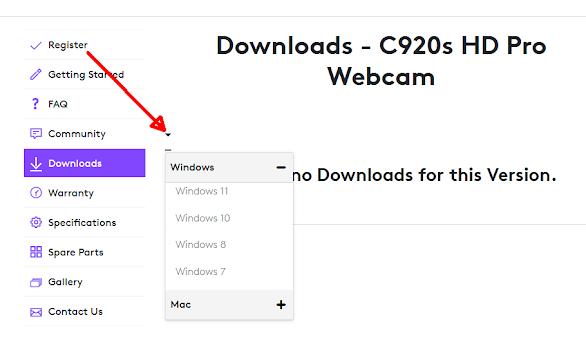
Problem: As stated, persists no matter what software you try (Logitech Gaming Software, Logitech HD 922 Camera App, Logitech G-Hub). Issue: The camera has a firmware bug that prevents zooming. No, seriously, it does .  There is no fixing it since there is no firmware update utility.  Seems to affect "newer" cameras, as the "older" / original cameras don't have this problem. Solution:  If the Logitech HD 920 Camera / Logitech Settings app doesn't work, just give up and get a C922.   No, really, just do it.  Don't waste your life trying to fix it.  Not only does the C922 not have this problem, but it is correctly recognized by the legacy Gaming Software (v9). Important note : The Logitech page is idiotic and will state "There are no Downloads for this Version.  You must select an OS from the little drop-down at the left: If you have no other choice, you can use Logitech Capture to process the camera feed on-the-fly to emulate zooming.  But ...

Don't buy a Ducati Hyperstrada

I rode an older Hypermotard in Europe, and really had fun.  Probably the most fun I'd ever had on a motorcycle, to be honest.  So I naturally wanted my own. Unfortunately, I'm too short to be in the Hypermotard club.  I was on tippy-toe the whole week in Europe, and it was not a good feeling.  I needed something shorter. Enter the late-model Hyperstrada.  Very much like the Hypermotard, but including panniers, all Hyperstradas after 2015 are 939s, and the "low" model.  After test-sitting one I knew it was OK for me. Don't get me wrong: this bike is fun.  Damn fun, actually.  And far more capable than I am capable of riding it. Unfortunately, it suffers from some glaring flaws that - somehow - nobody sufficiently points out. One is the legendary grabby clutch, a seeming constant characteristic of modern Ducatis.  That goes away once warmed up, but is irritating.  Still, no bike it perfect, and it's annoying but tolerable. Similar is the "...

My experience with ExpressVPN

 TL;DR:  It's not good. Fed up with PIA , I decided to try another VPN.  I thought it might be easiest. I wanted Hotspot Shield, but the fact that they log personally identifiable information, don't support pfsense and have no live support were deal-breakers.  I wanted it set up immediately.   I decided to bite the bullet and go with ExpressVPN.   More expensive, but most said they were next fastest, they had 24/7 support and supported DD-WRT (for now) and pfsense (for future).   I ponied up and got a login.  I had to run their app momentarily to find the fastest server, then I set it all up. Any it worked!  All my smart devices reconnected, all my strange connectivity issues went away.    However, I couldn't find the nameservers for secure DNS protection.  I asked their chat, and they didn't know what I meant. Turns out, ExpressVPN doesn't support this.  They do allow manual configuration (on DD-WRT or whatever), bu...